Lead management & market intelligence

Smarter Leads.
Cleaner Workflow.

Oppiq answers, qualifies and follows up on every channel you sell on — WhatsApp, Instagram, Facebook, Telegram, email, SMS and your website — while your team keeps only the conversations that need a human.

Get started free

Capture. Understand. Convert.

oppiq-app.ltlabs.in/inbox
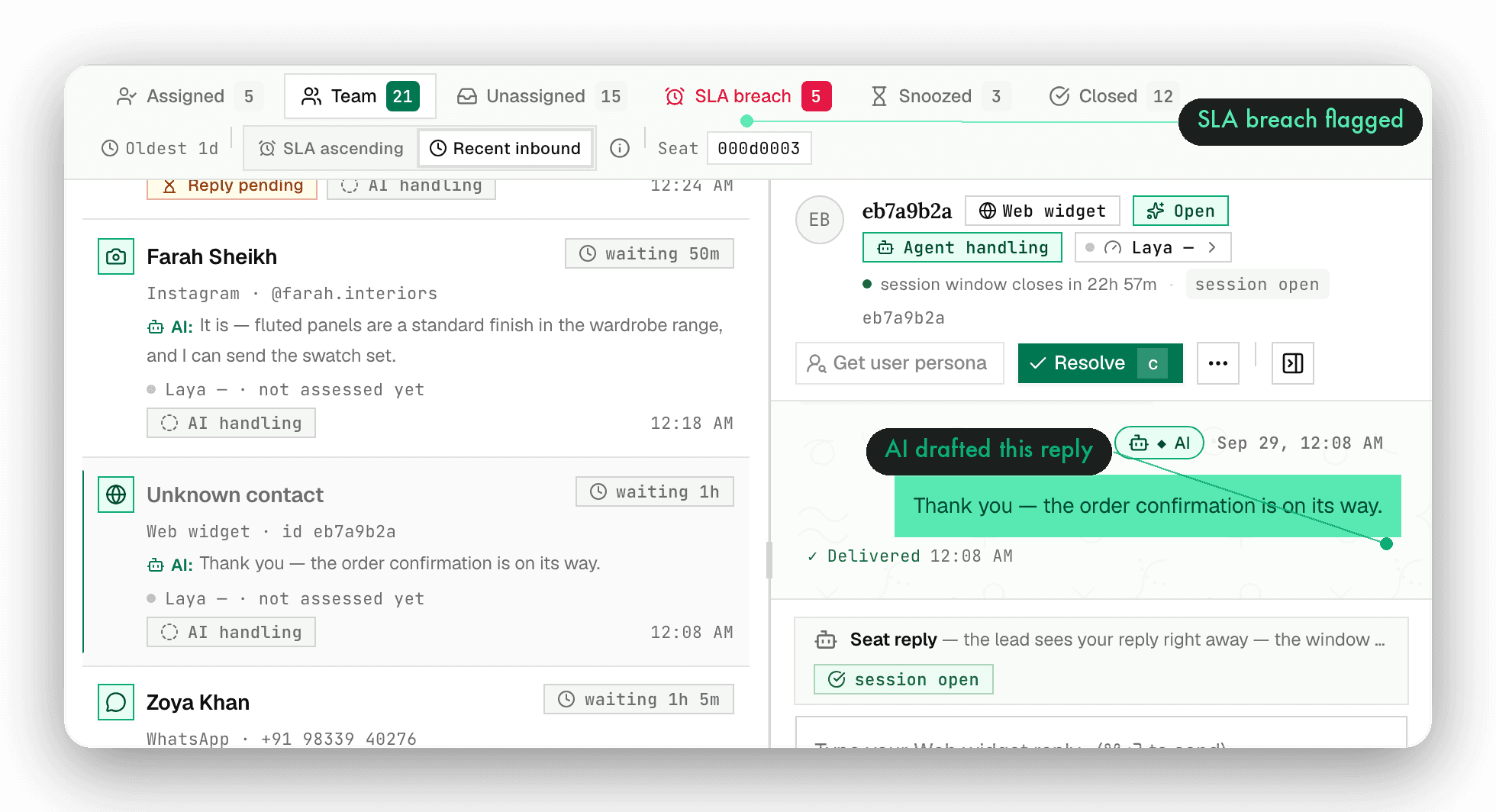
The Oppiq inbox: live queue, SLA timers, conversation thread and lead intelligence

One inbox · nine ways in

WhatsAppTemplates · sandbox / production WABA
InstagramDMs and story replies
FacebookPage messages
TelegramBot conversations
EmailShared team inbox
SMSTransactional replies
Web widgetDrop-in site chat
WebhookYour own systems
Customer portalSelf-serve follow-up
WhatsAppTemplates · sandbox / production WABA
InstagramDMs and story replies
FacebookPage messages
TelegramBot conversations
EmailShared team inbox
SMSTransactional replies
Web widgetDrop-in site chat
WebhookYour own systems
Customer portalSelf-serve follow-up

The gap

Leads do not get lost in one inbox.
They get lost between them.

Oppiq is one workspace for the conversations that become revenue: a single queue across every channel, an agent that answers in your voice, and a record that stays complete after the handoff.

Leads land in five inboxes across four devices

One queue, every channel, SLA timers running

Someone qualified last Tuesday, nobody followed up

The agent replies in minutes and schedules its own follow-ups

Answers change depending on who is typing

Replies grounded in your documents, with sources

You find out what the bot did when a customer complains

Every action logged, gated, and visible on the lead

The workspace

Eleven destinations.
One live workspace.

Not a dashboard you check, a workspace you work in. Seven of them, below, with the screens your team will actually live in.

01 / 7 · Workspace

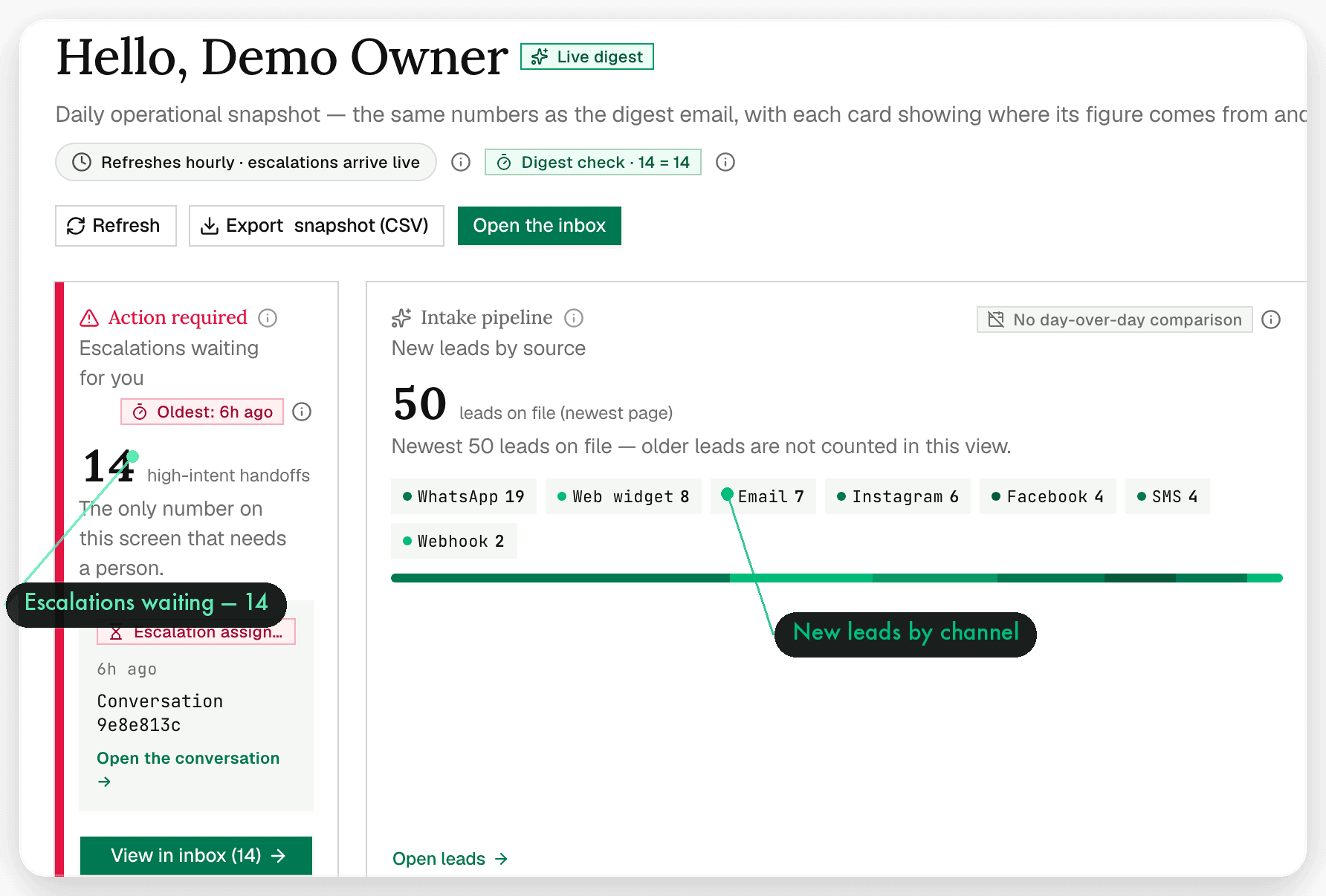
Home

Your day, already summarised.

Open the workspace to a single snapshot: the conversations waiting on a human, what the agent replied to overnight, follow-ups it queued, and the numbers that moved.

  • Daily digest instead of a dashboard to dig through
  • Agent activity and escalations side by side
  • One click from the summary into the live queue
oppiq-app.ltlabs.in/home
Oppiq — Home: Your day, already summarised.
02 / 7 · Operations

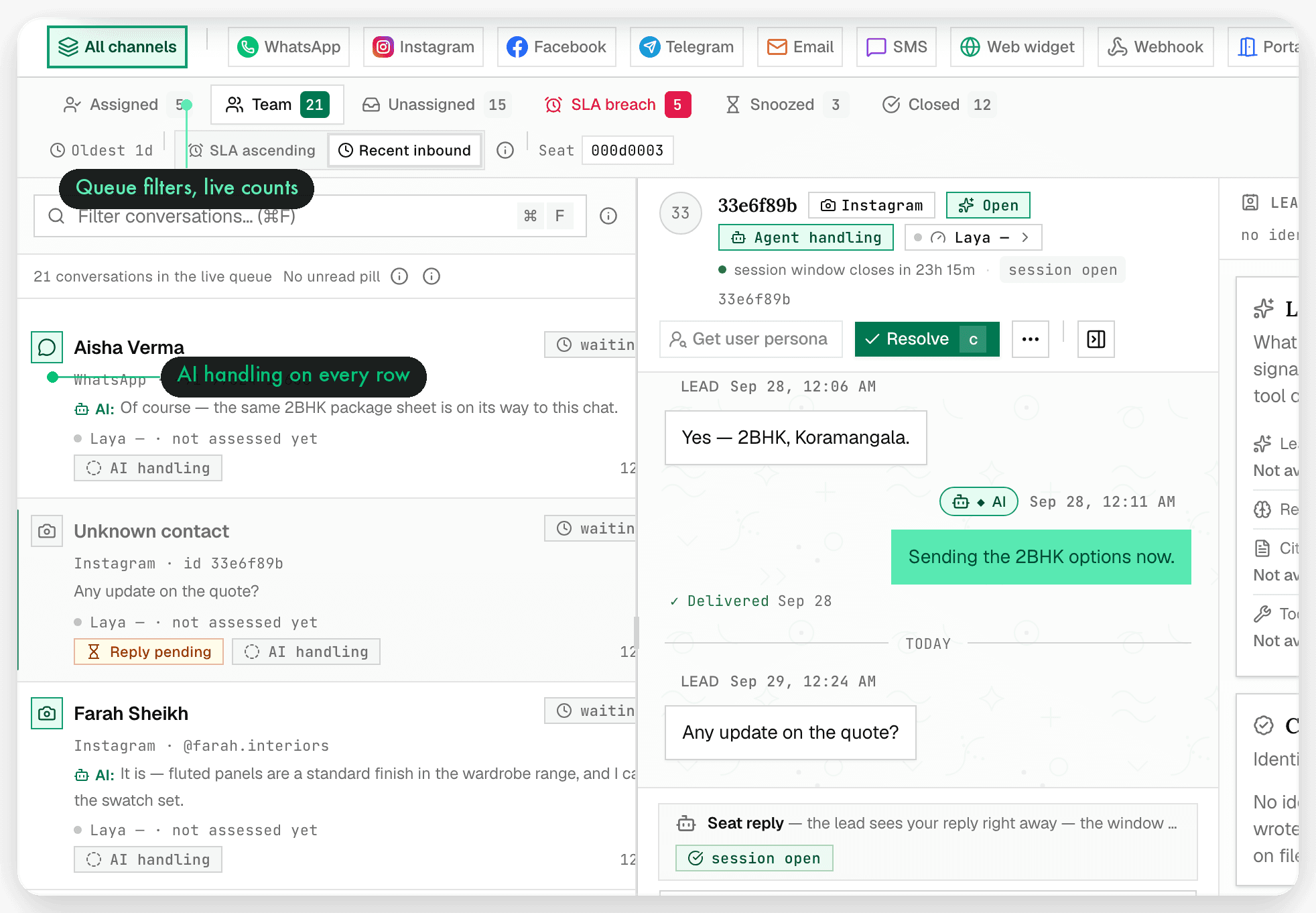
Inbox

One queue for every channel.

Every WhatsApp, Instagram, Facebook, Telegram, email, SMS and web conversation lands in the same live queue — with SLA timers, an SLA-breached view, snooze, assign and resolve.

  • SLA tracking with a dedicated breach queue
  • Approvals queue for anything the agent wants signed off
  • Keyboard-first: ⌘K palette, j/k to move, ⏎ to open, r to reply
oppiq-app.ltlabs.in/inbox
Oppiq — Inbox: One queue for every channel.
03 / 7 · Organization

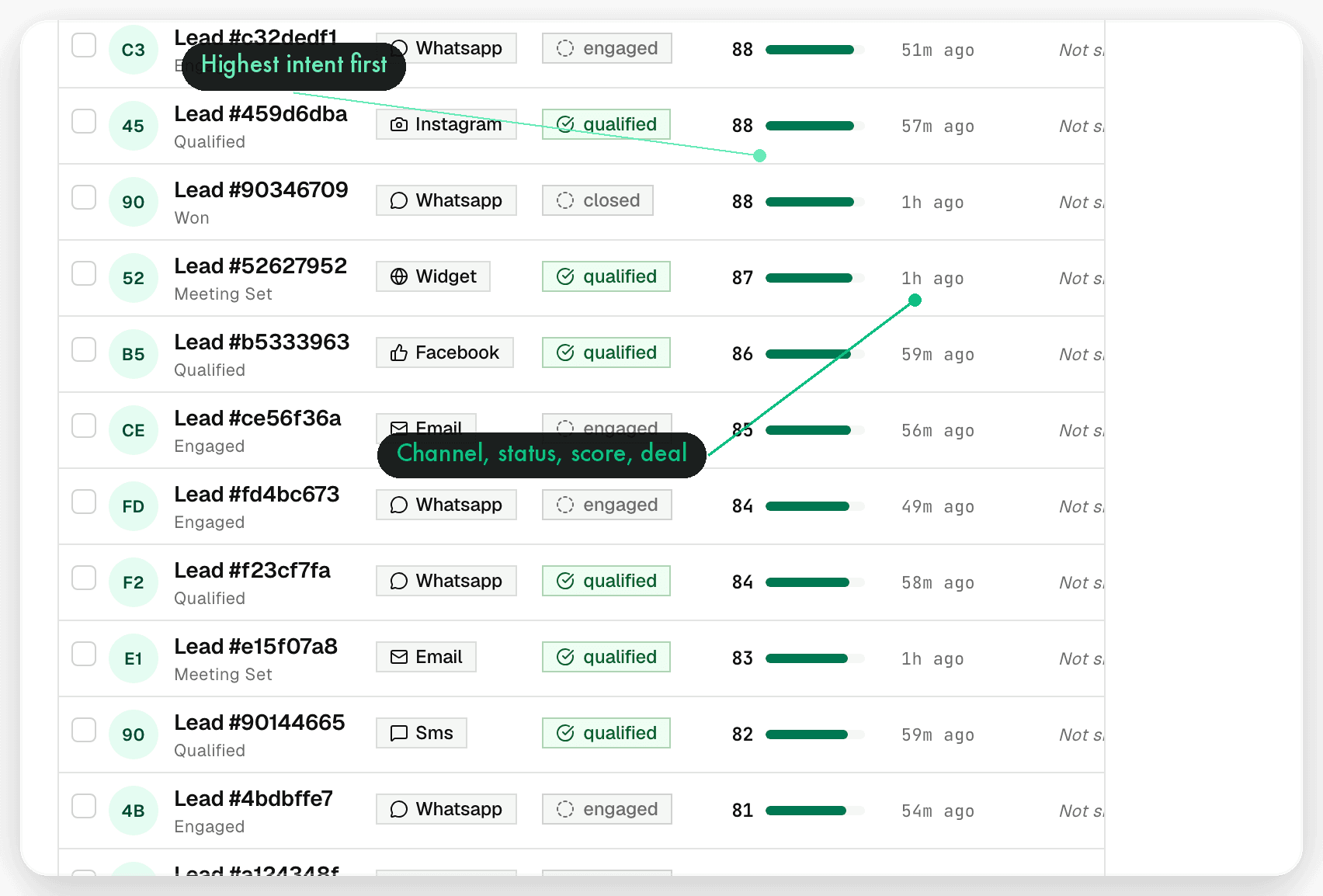
Leads

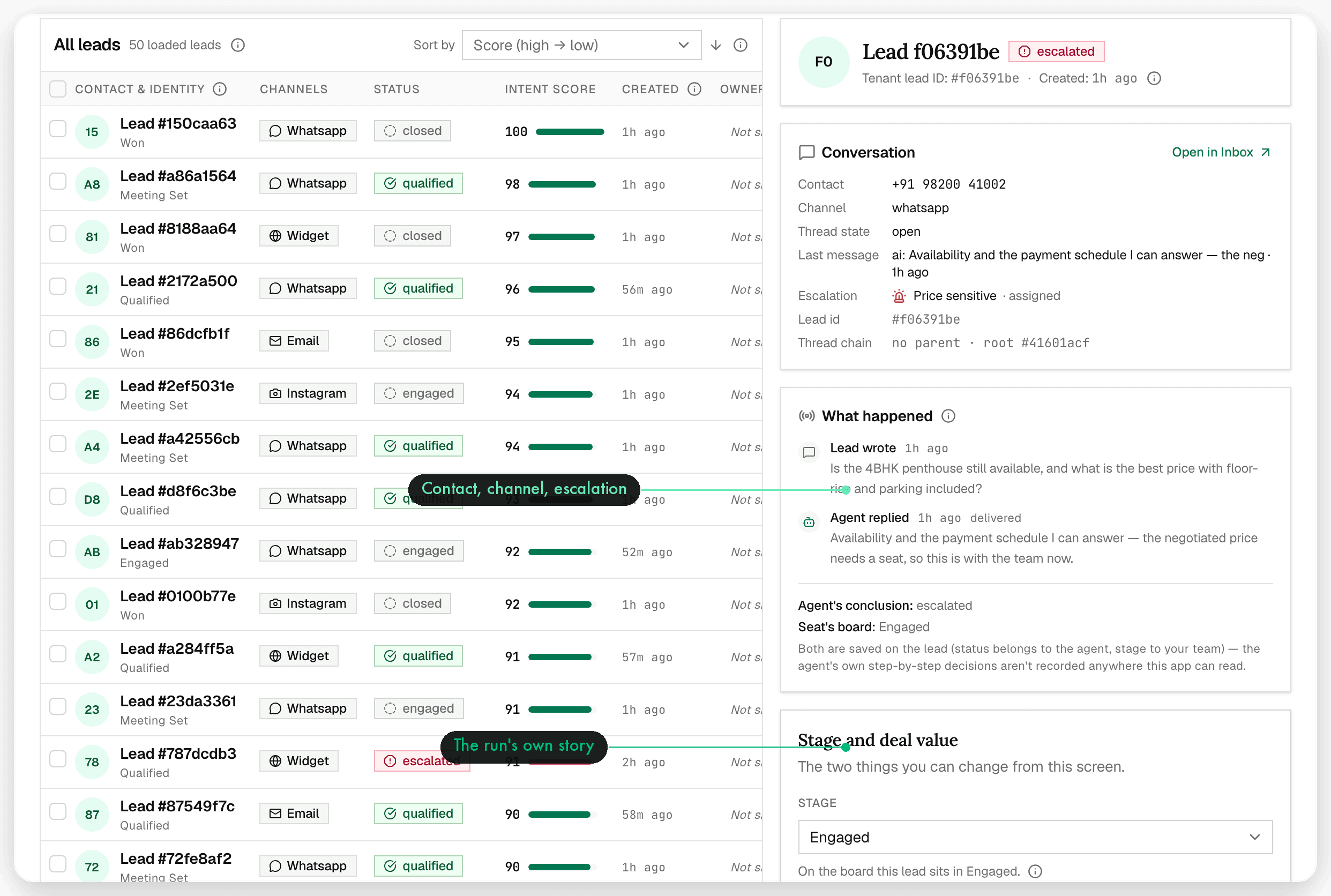
Every contact, one record.

The full contact list with the conversation history attached — filter by stage, owner, channel or source, and open a lead to see exactly what was said and by whom.

  • Filterable list across every connected channel
  • Lead detail with full cross-channel history
  • Owner, stage and escalation context in one view
oppiq-app.ltlabs.in/leads
Oppiq — Leads: Every contact, one record.
04 / 7 · Organization

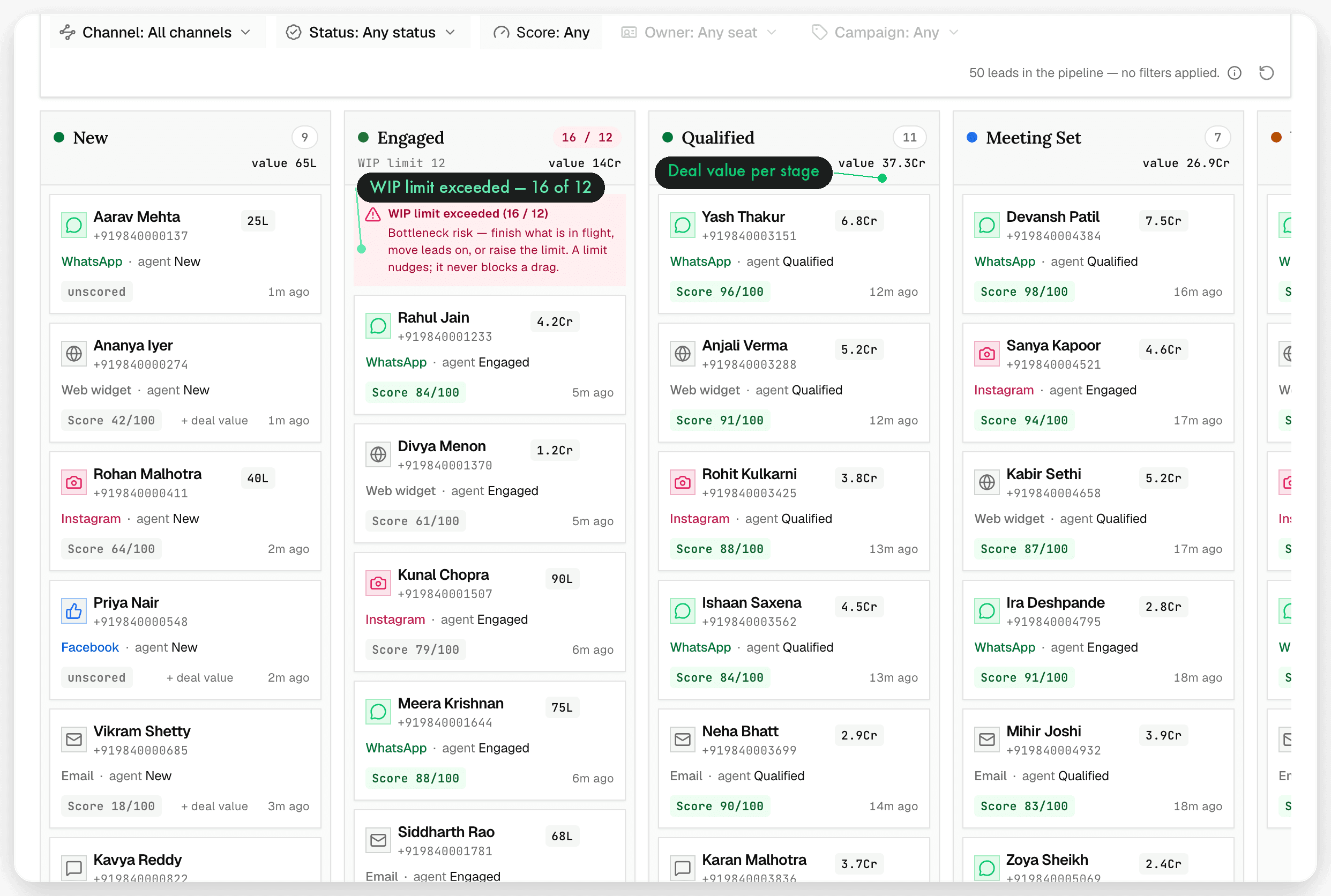
Pipeline

Kanban by stage.

Move leads through the stages your team actually uses. The board is the same record as the conversation, so nothing has to be re-typed after a call.

  • Drag-and-drop stages over live conversations
  • Stage changes stay attached to the lead record
  • Enough structure for a team, not a CRM migration project
oppiq-app.ltlabs.in/pipeline
Oppiq — Pipeline: Kanban by stage.
05 / 7 · Operations

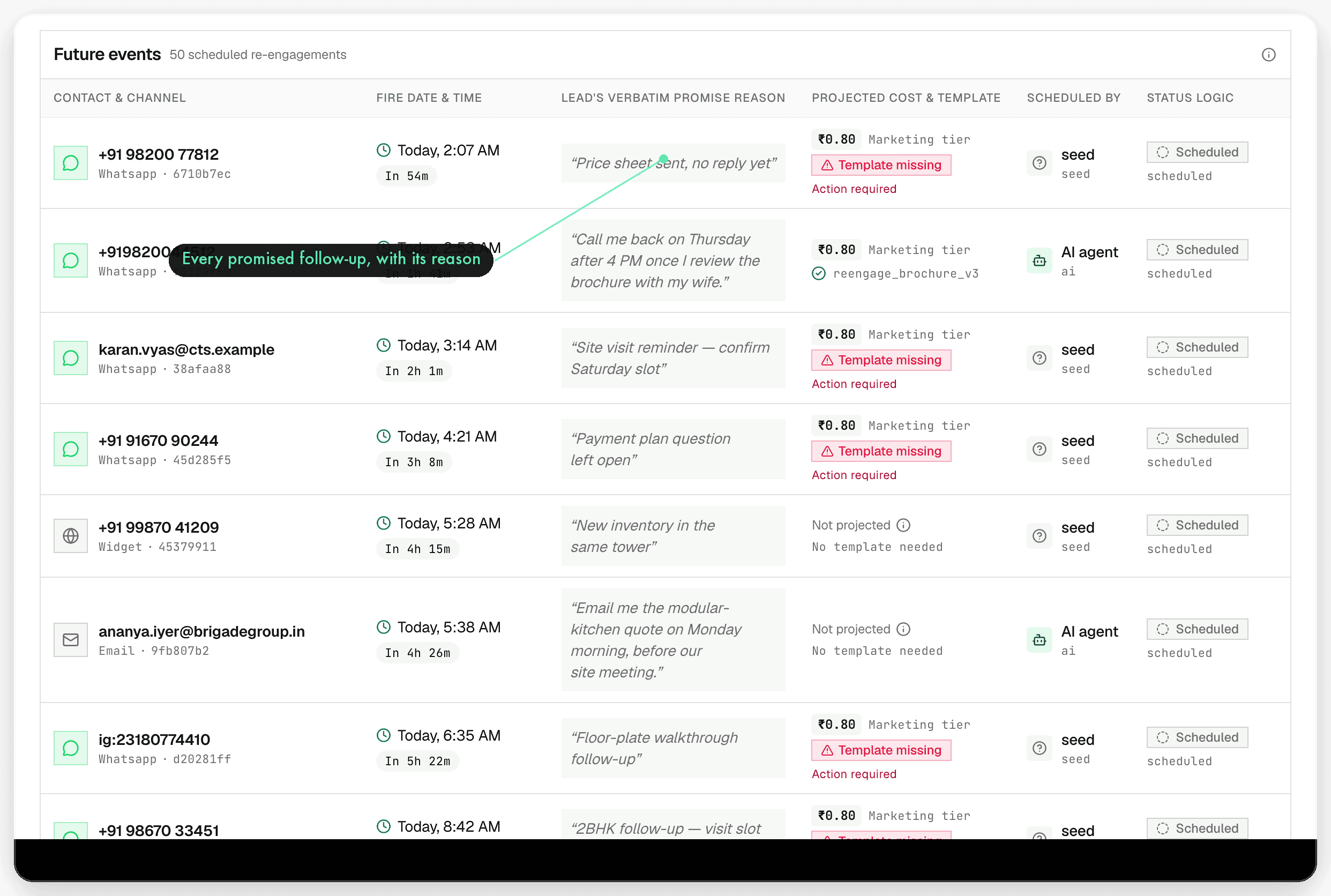
Scheduled

The follow-ups the agent promised.

When the agent tells a customer it will come back tomorrow, that promise becomes a scheduled item — visible, editable, and cancelled if the customer replies first.

  • Future re-engagements queued straight from conversations
  • Nothing the agent promised gets forgotten
  • Edit or cancel any scheduled touch
oppiq-app.ltlabs.in/scheduled
Oppiq — Scheduled: The follow-ups the agent promised.
06 / 7 · Organization

Knowledge

Answers grounded in your documents.

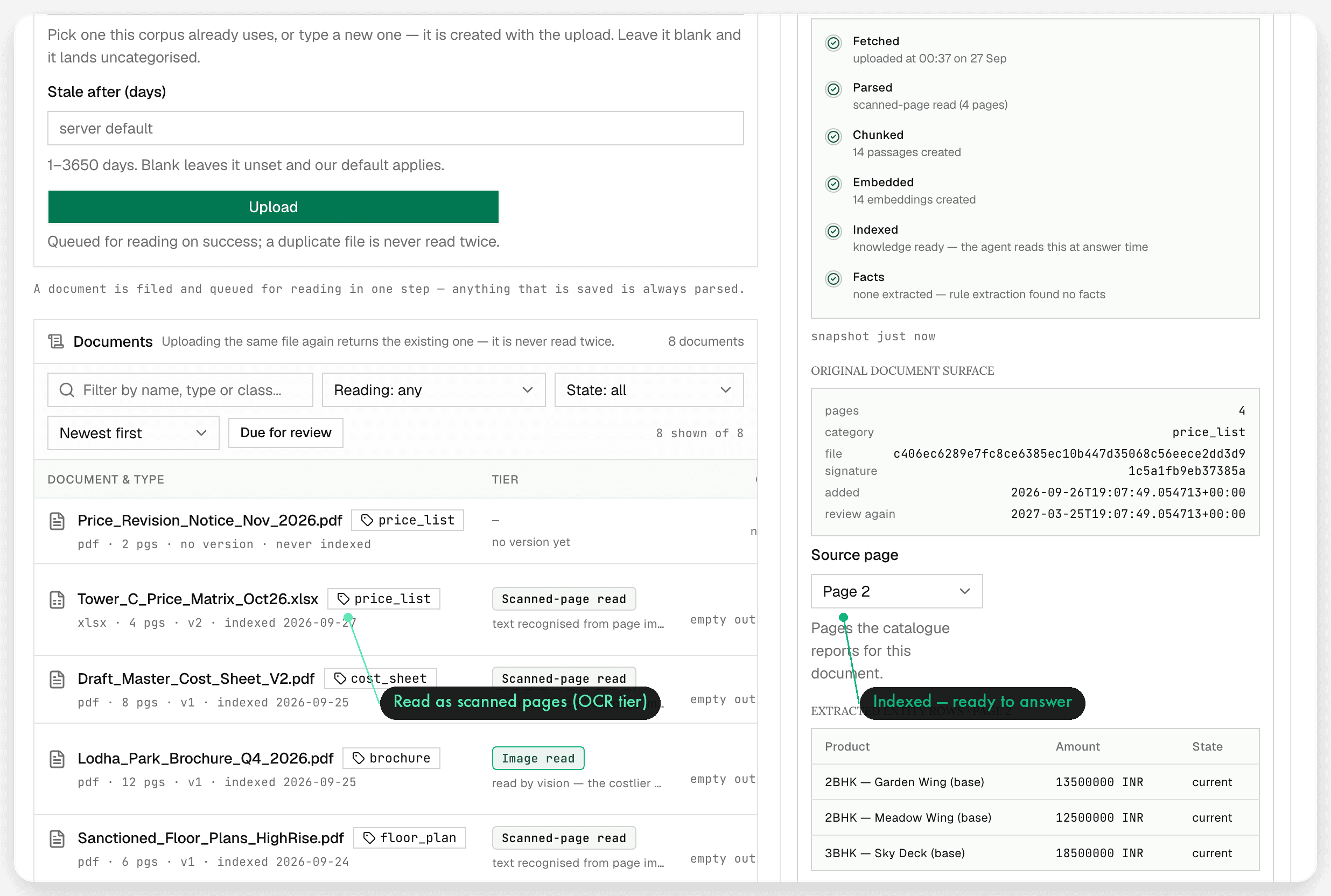
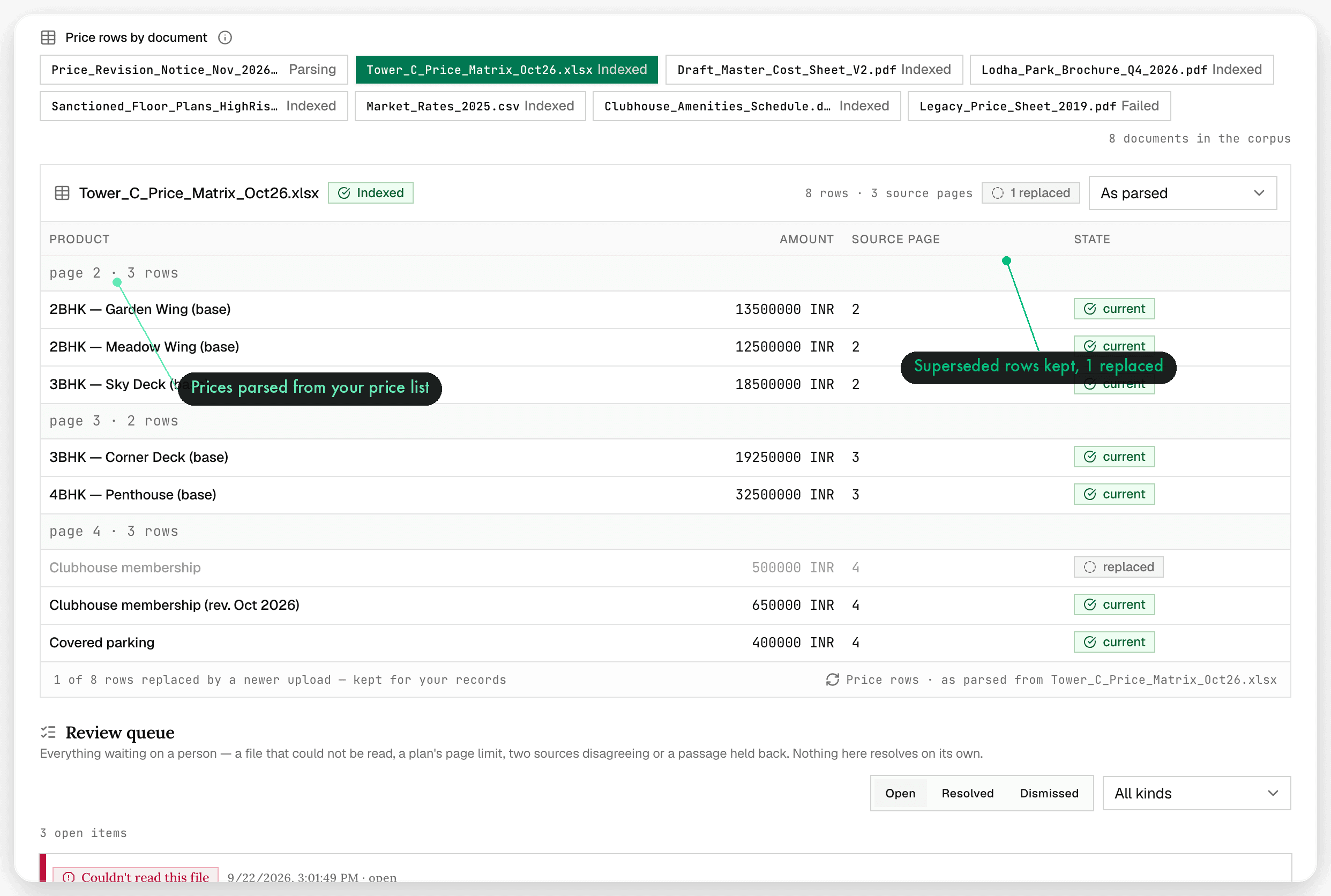
Ingest your documents, price lists and FAQs, add facts by interview, and the agent answers from them — with source inspection so you can see which passage produced a reply.

  • Multi-format document ingest, parsed automatically
  • Interview facts for the things that live in your head
  • Source inspection on every grounded answer
oppiq-app.ltlabs.in/knowledge
Oppiq — Knowledge: Answers grounded in your documents.
07 / 7 · Operations

Channels

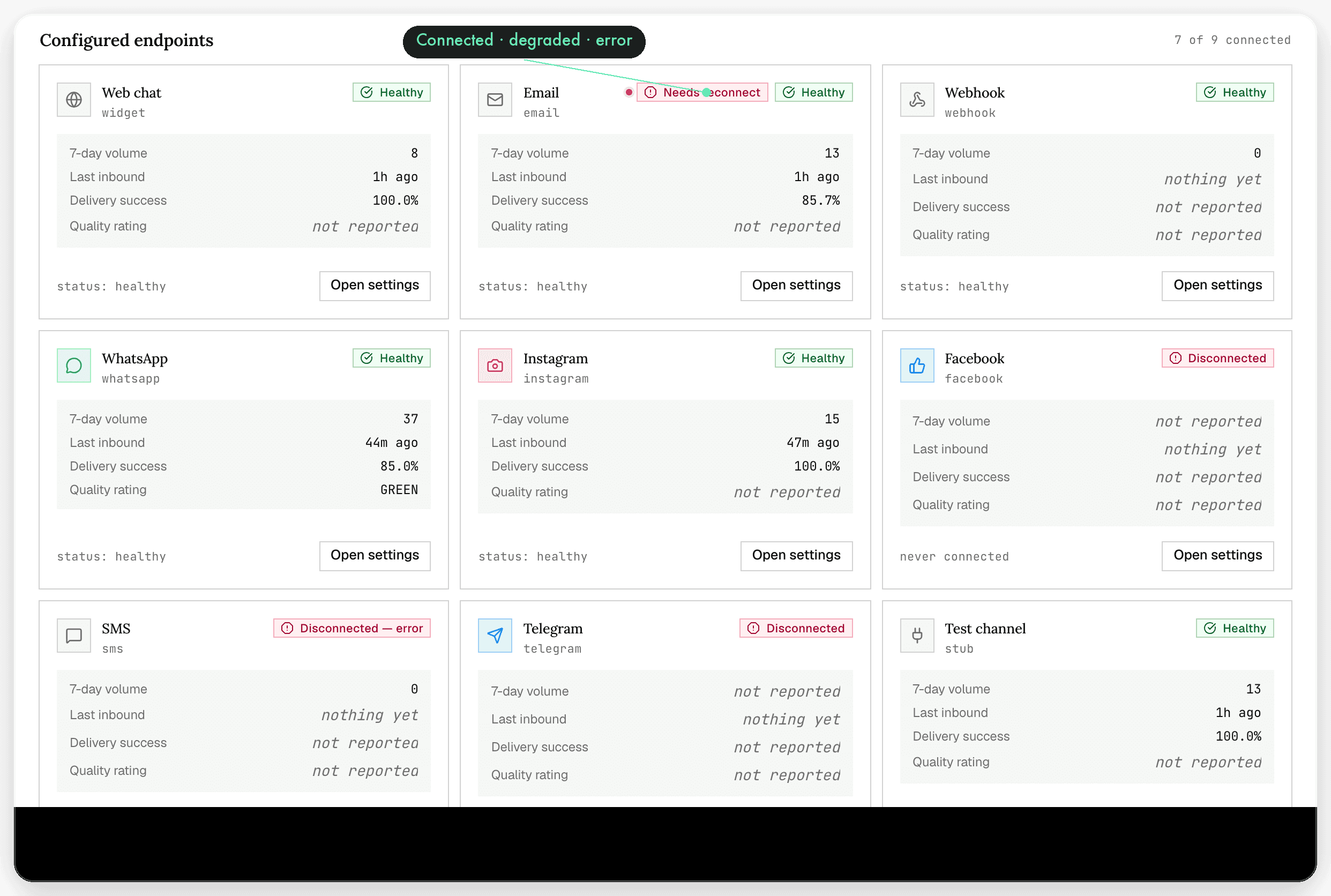
Status and config, per channel.

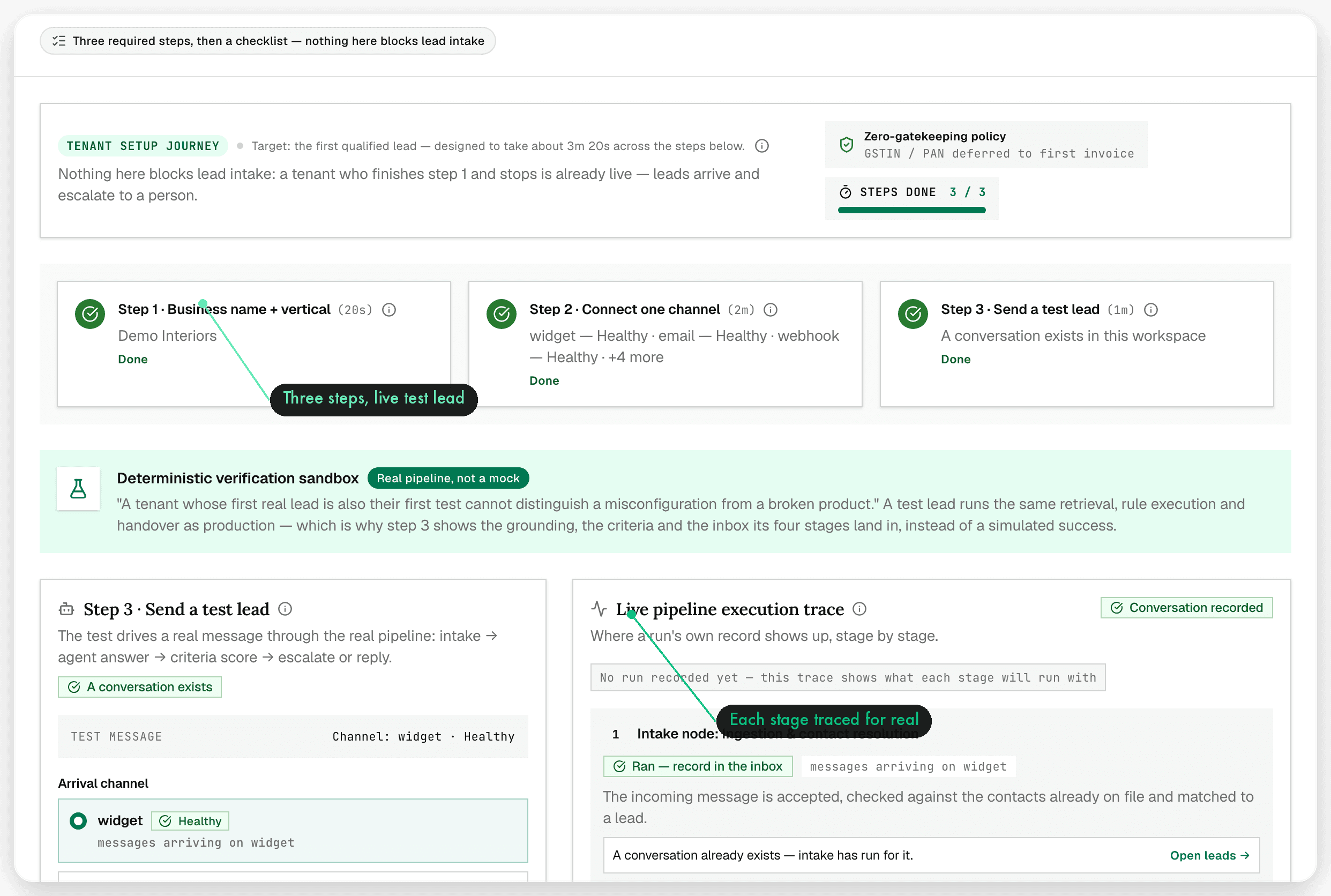
Connect and monitor each channel from one screen: WhatsApp with template management and sandbox/production WABA, Instagram, Facebook, Telegram, email, SMS, web widget, webhook and the customer portal.

  • Per-channel connection status at a glance
  • WhatsApp templates and WABA environments managed in-app
  • Web widget, webhook and customer portal for your site
oppiq-app.ltlabs.in/channels
Oppiq — Channels: Status and config, per channel.

Also in the workspace

The four destinations that keep it running.

Integrations, seats and routing, spend, and the rules the agent follows — everything the eleven destinations share one source of truth for.

Available now

Tools

Connected integrations, with authority.

Bookings, calendars and the systems your team already runs on, reached through one connector layer. Each tool carries an authority class: some actions the agent performs on its own, the rest wait for a human approval.

Operations
Available now

Team

Seats, roles, escalation routing.

Invite the people who answer, give them a role, and decide which conversations reach them. Escalation criteria decide when the agent stops and a seat takes over.

Organization
Available now

Usage & billing

Spend you can see.

A token meter against your plan allowance, credits, a spend cap that holds the line, and invoice preview plus history — all backed by an append-only ledger.

Workspace
Available now

Settings

Your rules, in one place.

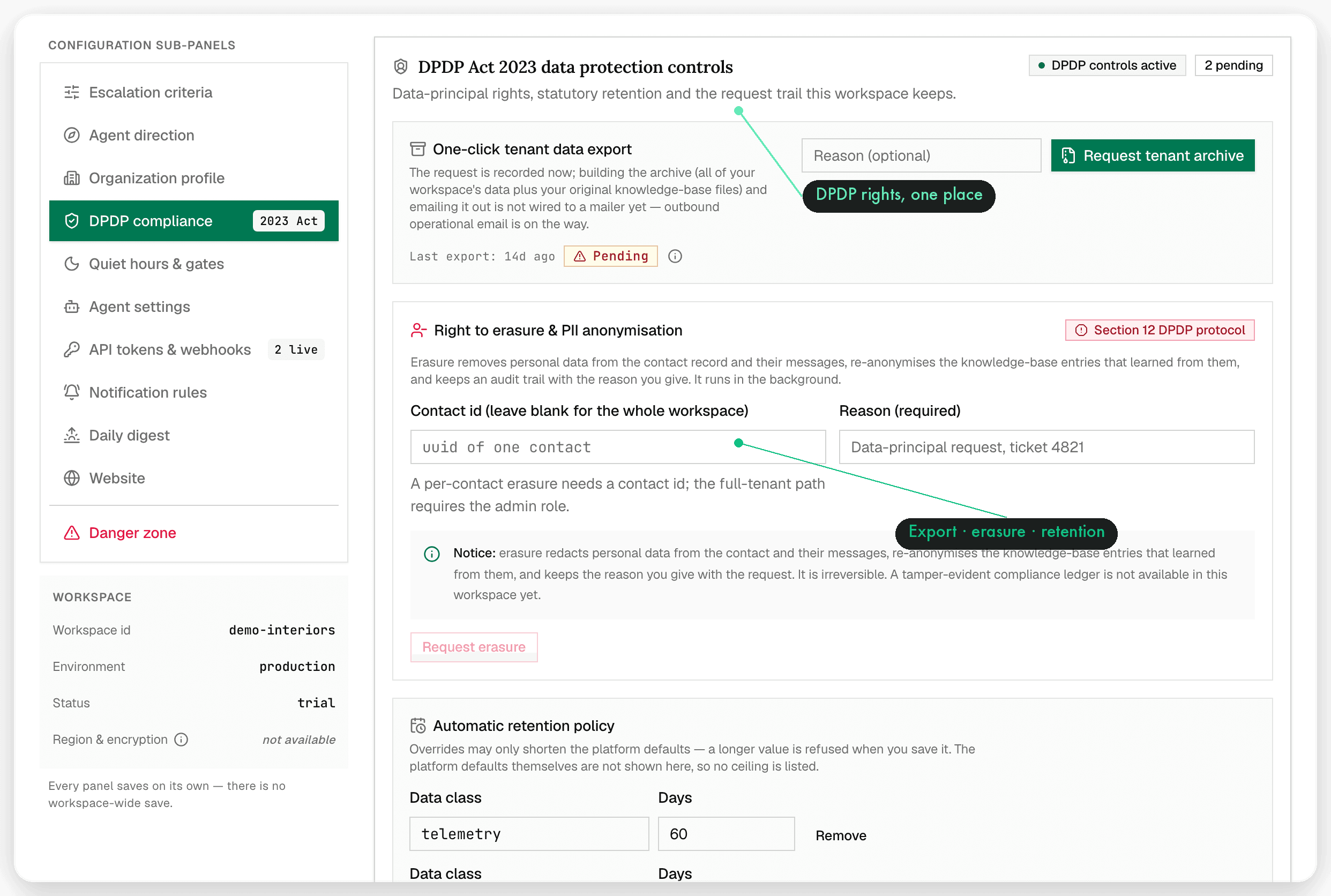
Profile, escalation criteria, website, quiet hours, DPDP data controls and API tokens. Everything the agent needs to know about how your business runs.

Workspace

The agent

An agent that reads, routes
and then knows when to stop.

Every inbound message is analyzed before it is answered. The agent replies autonomously when it can, escalates when it cannot, and gives the conversation back to a human completely.

Analyzer

Every inbound message is read for intent and sentiment before anyone answers — so urgency, buying intent and frustration are visible on the conversation, not buried in a wall of text.

intent + sentiment

Two-axis routing

Conversations are routed on two axes at once: what the customer needs and who can serve it. Qualified leads, requests, complaints and spam take different paths without a human triaging the queue first.

queue + seat

Replies in your voice

The agent answers autonomously, using your documents and your tone. If it does not know, it says so and escalates instead of improvising.

grounded

Channel switching

Follow the customer to another channel without losing the thread. The context moves with them.

continuity

Terminal handoff

When a conversation is escalated to a human, the handoff is terminal: the bot goes silent and a seat answers. No two voices in the same thread.

human in the loop

Approval interrupts

Risky or irreversible actions pause for a human approval before they run, and the request lands in the Approvals queue with the reason attached.

approval gate
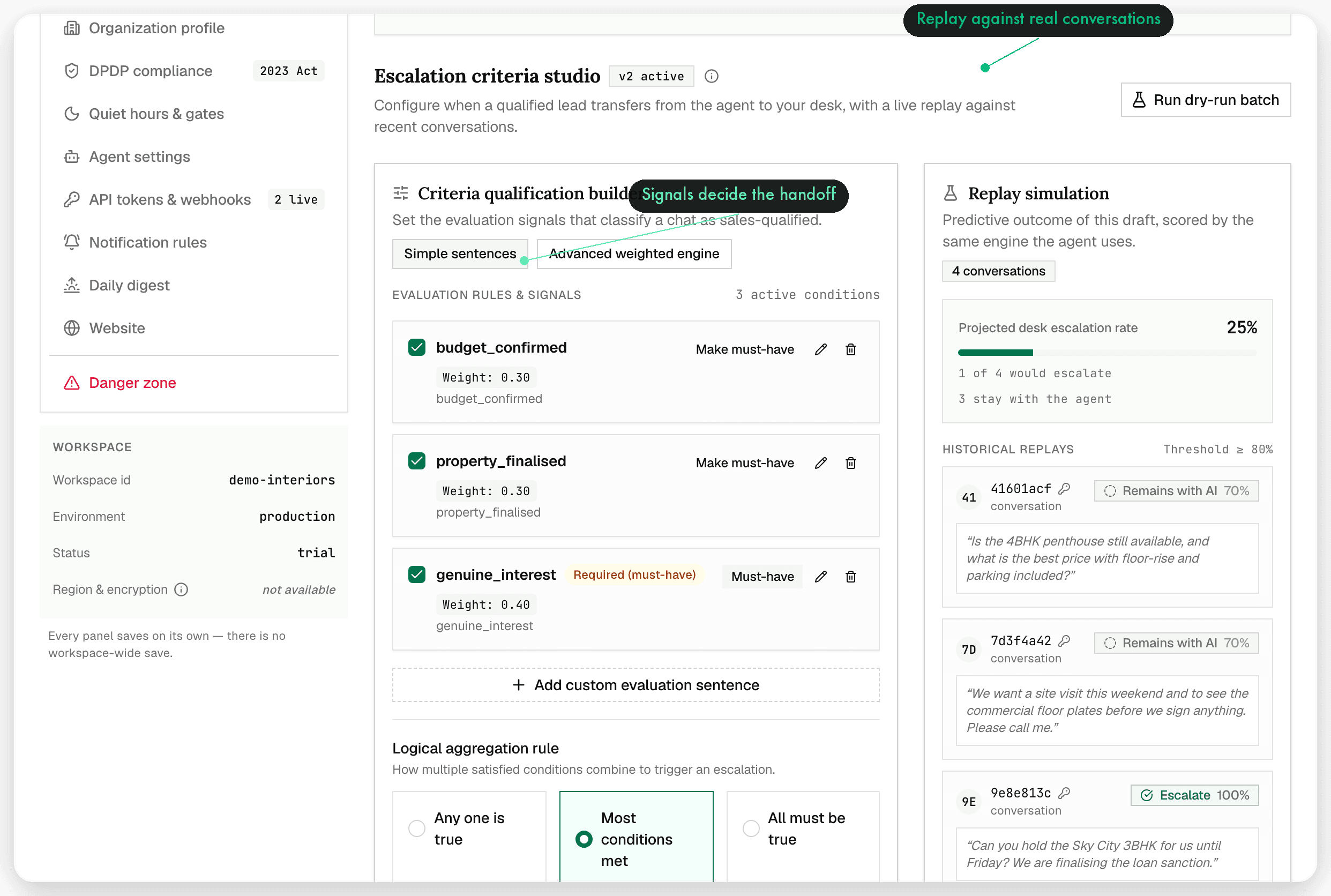
oppiq-app.ltlabs.in/settings/escalation
Escalation criteria studio — the rules that decide when the agent hands a conversation to a human

Escalation criteria studio

You write the rules.
The agent follows them, exactly.

Pricing questions, refunds, an angry customer, a VIP, a phrase you never want automated — put the boundary in the criteria studio once and every conversation respects it. When a rule fires, the handoff is terminal: the bot goes silent and a seat answers.

  • Boundaries expressed in your language, not a rules DSL
  • Approval interrupts for risky or irreversible actions
  • Escalation routing straight to the right seat

Platforms & channels

Every channel your customers
already use.

Connect them once. After that it is one queue, one SLA clock and one history per customer — whichever channel they chose that day.

  • SLA timers on every conversation, with a dedicated breach queue
  • Snooze, assign and resolve without leaving the thread
  • Approvals queue for actions the agent wants signed off
  • ⌘K command palette with j/k, ⏎ and r keyboard flow
  • Notification bell and environment banner so nobody guesses

WhatsApp done properly: template management and separate sandbox and production WABA environments, managed from inside the workspace.

keyboard-first· notifications·customer portal
connected

WhatsApp

Templates · sandbox / production WABA

connected

Instagram

DMs and story replies

connected

Facebook

Page messages

connected

Telegram

Bot conversations

connected

Email

Shared team inbox

connected

SMS

Transactional replies

connected

Web widget

Drop-in site chat

connected

Webhook

Your own systems

connected

Customer portal

Self-serve follow-up

More channels & AI actions

coming soon

How it works

From a message arriving
to a lead that moved.

The same six steps run on every conversation, at every hour, on every channel.

  1. 01A message arrivesWhatsApp, Instagram, Facebook, Telegram, email, SMS or the web widget. It lands in the unified inbox with the customer's history attached.
  2. 02The analyzer reads itIntent and sentiment are scored before anyone touches the conversation — urgency and buying signal surface immediately.
  3. 03Routing decides the pathTwo-axis routing sends it to the right queue and the right seat, with SLA timers started from the first message.
  4. 04The agent repliesAn answer in your voice, grounded in your knowledge, checked by the outbound safety gate, and logged against the lead.
  5. 05A human takes over when it mattersEscalation criteria fire, the handoff is terminal, the bot goes silent, and your seat answers a customer who is already in context.
  6. 06The lead keeps movingFollow-ups are scheduled, bookings are created or cancelled, the pipeline stage updates and the record stays complete.
oppiq-app.ltlabs.in/scheduled
Scheduled follow-ups the agent promised during conversations
06

The loop closes: the lead moves a stage, the follow-up is on the calendar, and the conversation history travels with the record — no re-typing, no “who spoke to them last?”

See it in motion

The product film,
start to send.

Launch film · 01:15 · silent

Every frame is the real product on demo data — inbox, agent, gates, handoff

Trust & compliance

Guardrails you can
point at.

An autonomous agent is only useful if its limits are real. These are enforced in the product, not promised in a policy document.

row-level security

Isolation at the database

Every tenant's data is separated by row-level security enforced in the database itself — not by an application filter that a bug can skip.

break-glass, logged

Audited support access

Break-glass support access is explicit and audited. Nobody reads your workspace quietly.

sanitize · hold · reject

Outbound safety gate

Nothing the agent writes reaches a customer unchecked: messages pass a sanitize / hold / reject chain before they are sent. The agent never sends directly.

approvals

Human in the loop

Approval interrupts and terminal handoff keep a person in charge of anything risky or sensitive.

spend cap · kill switch

Spend caps & kill switch

A hard spend cap and a kill switch that stops the agent outright — limits you set, not limits you hope for.

DPDP · consent · retention

DPDP-ready controls

Consent, retention and data controls built for India's DPDP regime, with an append-only ledger behind billing.

The agent never sends directly. Every outbound message passes a sanitize · hold · reject gate first.

outbound safety gate chain

Roadmap

What we are building
next.

No dates, no vapour — the modules that are designed or in development, and will ship inside the same workspace.

Coming soon

AI website builder

Describe the business and generate a lead-capturing site wired straight into your Oppiq workspace.

In design
Coming soon

Expanded integration marketplace

More of the tools your team already runs on, available through the same connector layer.

In development
Coming soon

Advanced analytics & reporting

Deeper reporting on response times, conversion by channel and agent performance over time.

Planned
Coming soon

More channels & AI actions

Additional messaging surfaces and more actions the agent can take with approval.

Planned

Roadmap items are not available in the product today. Everything else on this page describes shipped behaviour — verified against the app, not a deck.

Brand film · 00:25

Capture. Understand. Convert.

Smarter Leads.
Cleaner Workflow.

Put every conversation your business has into one workspace, and let the agent handle the ones it should — with the guardrails already in place.

Get started free

Connect a channel · invite a seat · answer your first lead today

Oppiq

The lead-management and market-intelligence workspace: one omnichannel inbox, an agent that answers in your voice, and guardrails that keep a human in charge.

Smarter Leads. Cleaner Workflow.

Channels

  • WhatsApp
  • Instagram
  • Facebook
  • Telegram
  • Email
  • SMS
  • Web widget
  • Webhook
  • Customer portal
Bumper · 00:06

© 2026 Oppiq. All rights reserved.

Oppiq is a product of Luminatech Solutions LLP

Privacy PolicyTerms of Service

Screenshots show the product running on demo data · roadmap items are not yet available